You can keep Withings weight, sleep, steps, and a weekly health score visible without repeatedly opening the Health Mate app. An e-paper desk display can place a personal weekly view, or a family view for up to four people, on one e-ink screen you can leave in view. Everview’s Withings-compatible health display is pre-configured from your Health Mate account email, and the official product photos show those two layouts rather than a phone dashboard.
If you want a dedicated desk display for this view, see the Everview Health Wellness Tracker.
What can a Withings e-paper desk display show?
The Health Mate app and Withings online dashboard are where you review a full measurement history. A glanceable e-ink screen brings a shorter version of that picture onto a desk, a fridge, or a metal board.
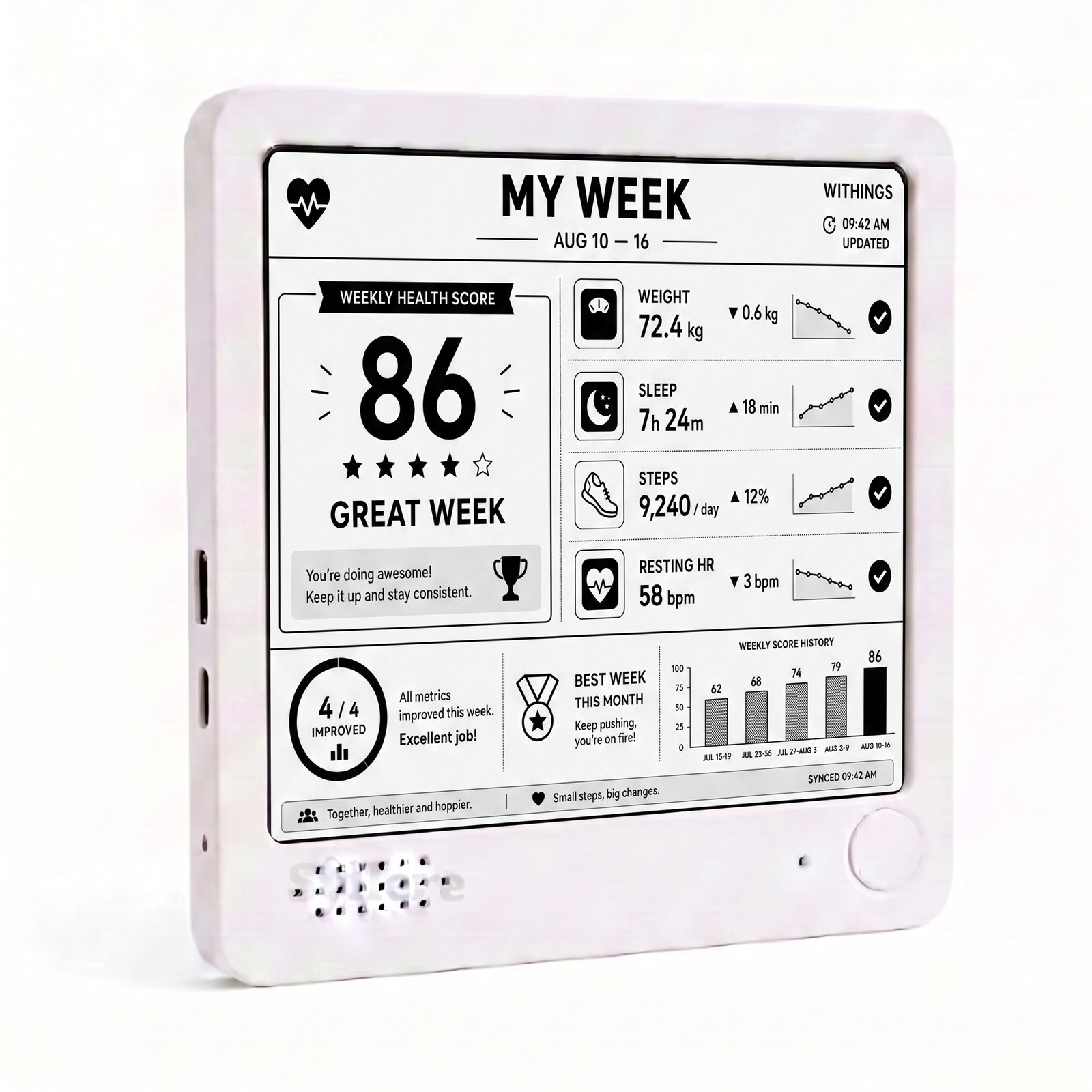
The official photos on this Everview listing show two black-and-white layouts:
- A personal “My Week” view with a weekly health score from 0 to 100, trend lines for weight, sleep, steps, and resting heart rate, a comparison with the previous four weekly scores, and short messages such as “Great Week!” or “4/4 improved.”
- A “Family Health” view that shows weight, steps, and sleep for up to four family members, plus combined family daily goals, a family score, and a “Top Performer” based on steps.
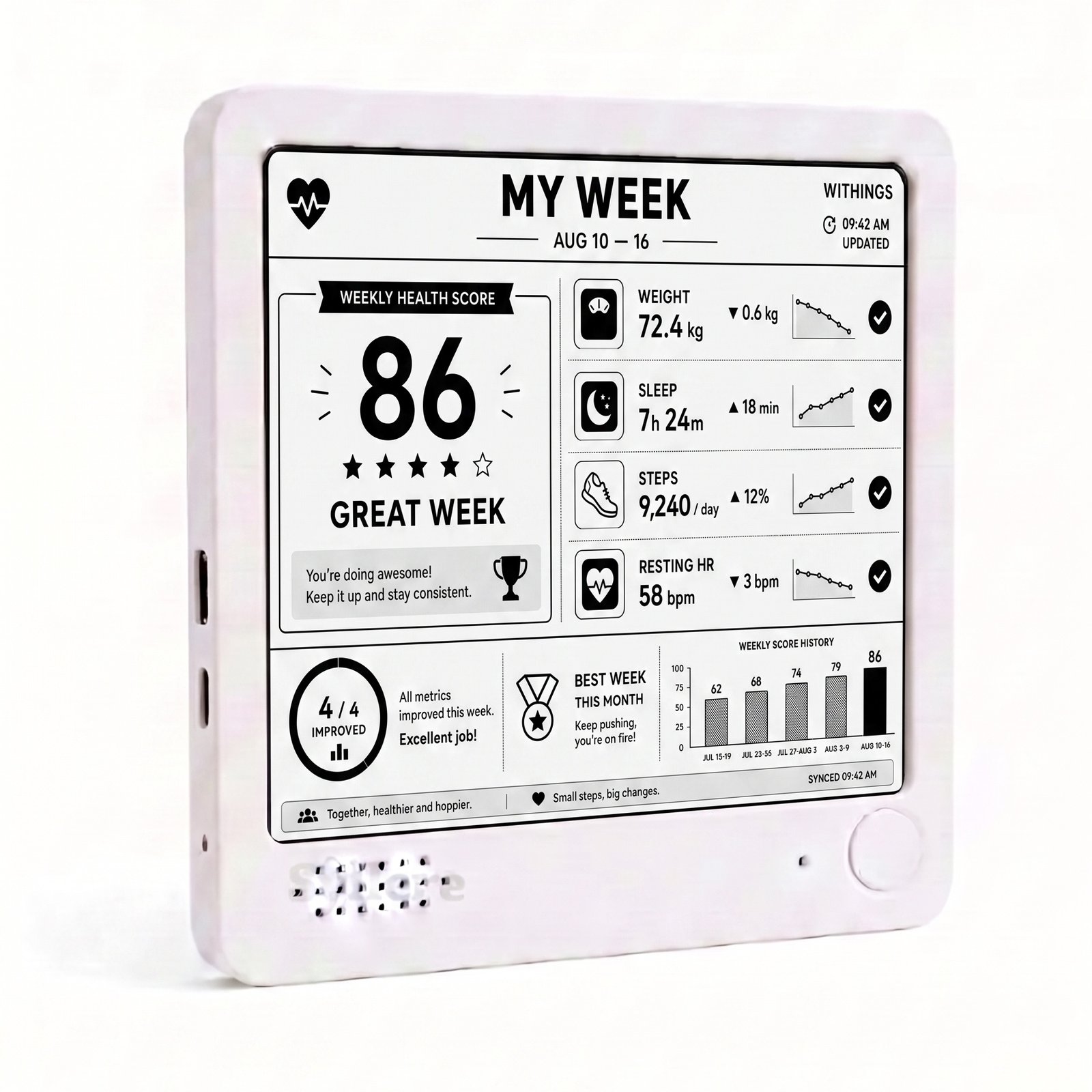
This product-listing photo shows the personal weekly layout. The sample score of 86, the date range August 10–16, and the example figures for weight, sleep, steps, and resting heart rate illustrate the design. They are not typical results, and they are not a promise of health outcomes.
How is a desk display different from the Health Mate app and web dashboard?
Withings’ official app and online dashboard remain the place to inspect individual readings, manage profiles, and review a longer history. Those tools can show many measurement types, including weight, sleep, steps, and heart rate. Opening them usually means unlocking a phone or signing in on a computer.
A desk display answers a narrower question: when you walk through the kitchen or sit down at a desk, can you see this week’s trend, or how the household is doing today, without opening the app? Everview describes the screen as paper-like e-ink, similar to a Kindle: crisp, glare-free, and readable in direct sunlight. The listing also describes a built-in battery that can last up to a week on a charge, USB recharging, a magnetic back, and an included stand.
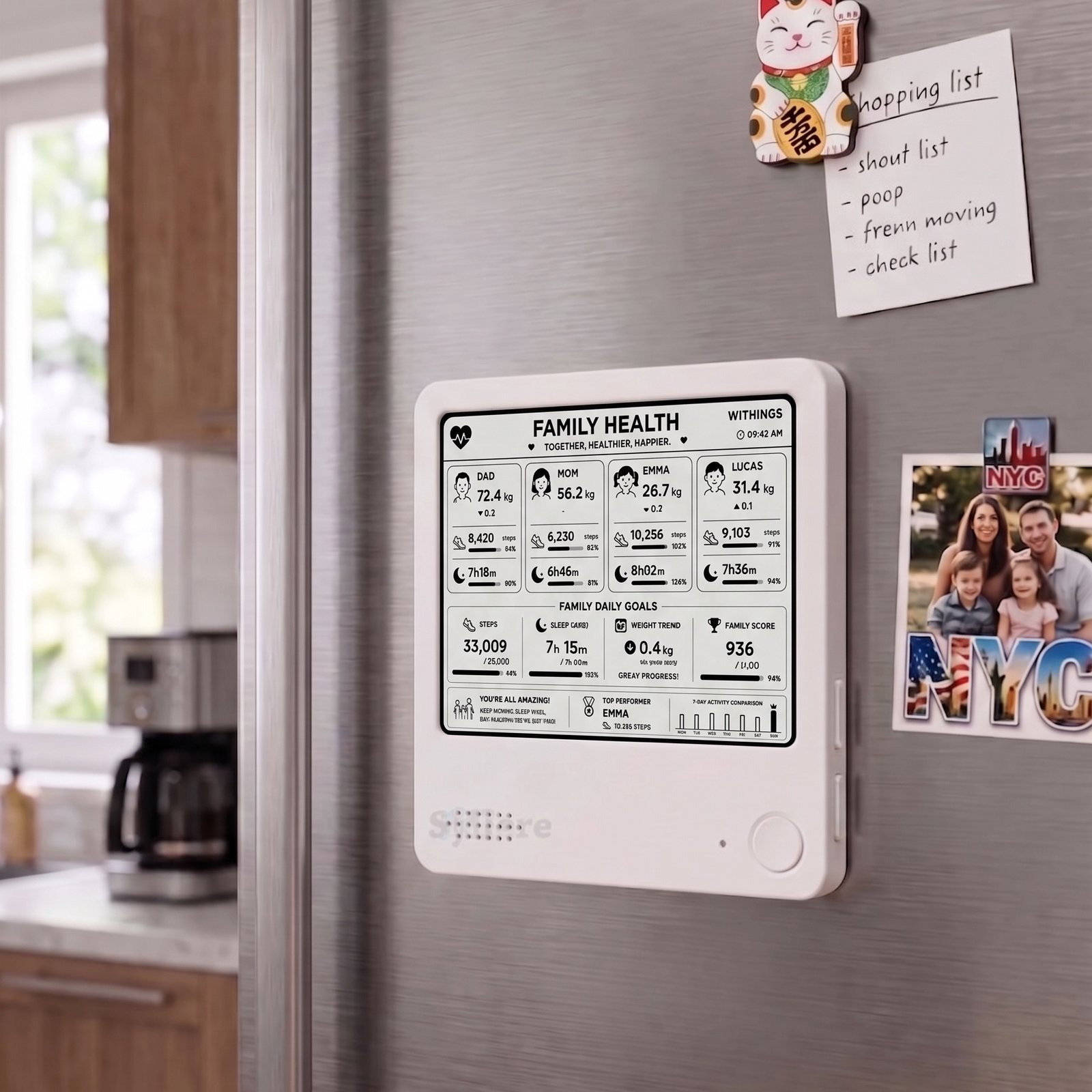
One official photo shows the family layout on a refrigerator, which matches the magnetic back described on the product page. Treat the names and figures on that screen as examples of the layout, not as a real household’s results.
Should you choose the personal view or the family health view?
The checkout dropdown lists three dashboard experiences, all at the same price, and all with a black-and-white screen:
- Personal, which the listing also calls the Standard “Personal Health Score” view, is for one person who wants to see weekly progress over time.
- Family, also called the Premium “Family Health” view, is for households that want to stay active together. It tracks weight, steps, and sleep for up to four people, shows combined steps, average sleep, and weight trends, and crowns a Top Performer based on steps.
- Customize is offered at the same price, but the listing does not publish a separate screen layout for that option. If you need a different arrangement, the product page says you can send a message and the device can be reprogrammed remotely.
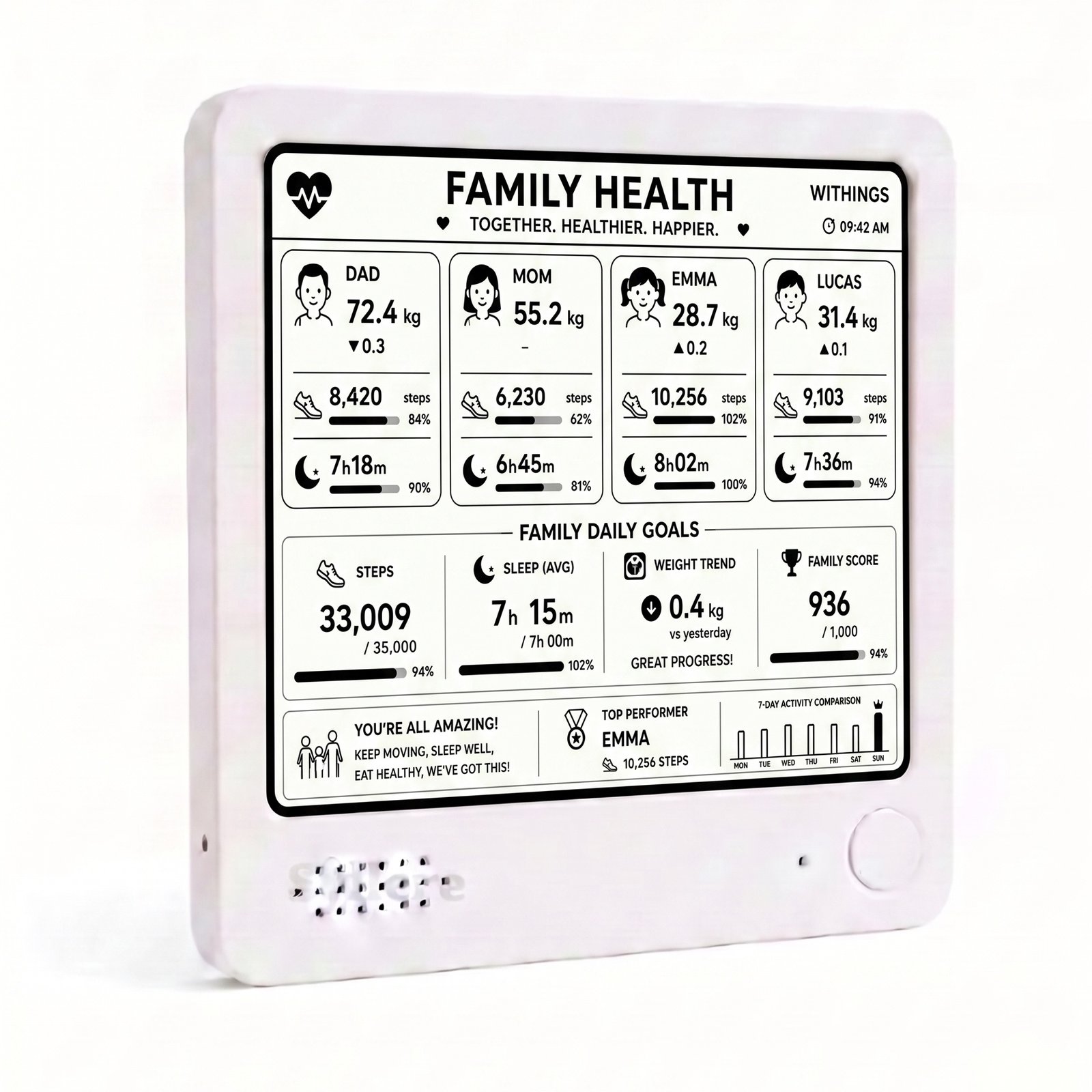
The family product photo shows four example profiles—Dad, Mom, Emma, and Lucas—along with family daily goals, a family score, and a seven-day activity comparison. The Top Performer in this sample is Emma, with 10,256 steps. These names and numbers are examples of how the layout can look.
If your main need is one person’s weekly score and trend lines, the personal view is the closer match. If you want the household’s steps, sleep, and weight on one shared e-ink screen, choose the family view. Resting heart rate appears in the personal weekly layout.
How do you get Health Mate data onto an e-ink desk display?
The public listing does not publish a click-by-click Withings login sequence, and it does not ask you to create an API app yourself. The setup steps on the product page are:
- Purchase the device and select your preferred view—Personal or Family—from the dropdown.
- At checkout, enter your Withings Health Mate account email, or your family account details.
- Everview pre-configures the display before shipping so it is ready to use when you unbox it.
If you use Apple Health or Fitbit instead of a Withings Health Mate account, the listing asks you to contact Everview for a compatibility check.
If a dashboard later gets stuck when you switch views, or you want a different metric, Everview says its engineers can help through over-the-air support after you send a message. The product photos include an “Updated” or “Synced” timestamp, but the listing does not publish a refresh interval, so this article does not describe the display as live or real-time.
What should you check before buying a Withings desk display?
Before you choose any glanceable display for Withings health data, match the screen to the decisions you actually make:
- Confirm that you have, or can share, a Withings Health Mate account if you want the pre-configured setup described on the page.
- Choose Personal or Family based on whether you need one weekly score or a shared view for up to four people.
- Keep the official Withings app and dashboard for detailed records and profile management. This display is a desk view, not a replacement for those tools, and it is not presented as a medical device.
- Note the current product-page details: $69.00 USD for the black-and-white screen, plus a fixed $15 USD shipping fee for worldwide delivery. The listing does not publish a subscription price. The box includes the display and setup instructions. This listing does not offer a color screen option.
What should you keep in mind?
A display like this is for seeing trends at a glance, not for diagnosing health or replacing your Withings devices. Use it as a snapshot of the connected Health Mate data, and open the official app or dashboard when you need a full history or to change a profile. The sample figures in the product photos are examples of the layout, not typical results. The weekly health score and family score are features of the Everview layouts shown on the listing; they should not be read as official Withings diagnoses or guaranteed outcomes.
If you also want a glanceable household view for home energy, Everview has a guide on how to compare Tesla Powerwall energy with grid use and prices at a glance.
If you want Withings family or personal health trends visible on the desk, the Everview Health Wellness Tracker is the listing that matches this e-paper view.